



 Takeaways
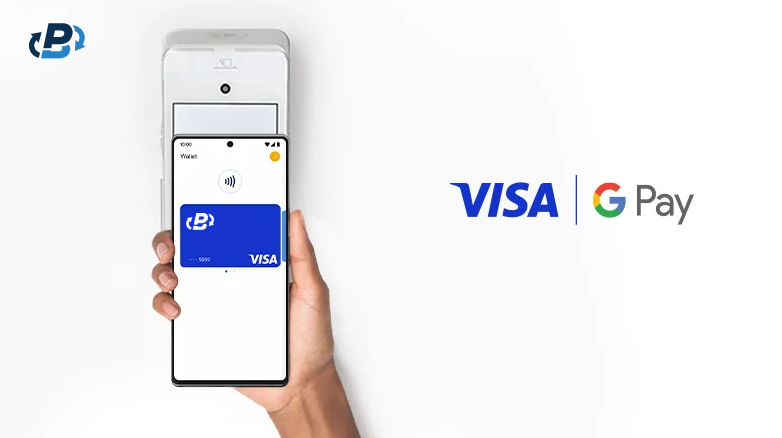
It’s never been easier to pay for our purchases, whether by entering card details online or by tapping our phones on an in-store register. We can even top up our crypto cards and use them in any way and in any place as our debit cards. What’s the difference? One is a regular debit card loaded with fiat, and the other is a regular debit card loaded with crypto, which is then converted to fiat. The end experience is the same. Users don’t need to worry about complex technical details, because the card provider takes care of it all behind the scenes, making crypto payments as intuitive as traditional payments. You just need to load and pay. This also means that, if you’re using a PlasBit crypto card via your Google Pay, nobody cares that you’re actually paying with crypto, because they see a typical debit card that pays them in fiat. The key question is, can you add crypto card to Google Pay? Yes, you can order a crypto card, load balance onto it, add the card details to your Google Pay, and add it as the payment method in your Google Wallet. A crypto card is just like any other regular debit or prepaid card, and it can be used on Google as a payment method.
Crypto Cards Feel Like Regular Debit Cards
Crypto cards work as your regular bank debit cards and, besides loading them with crypto, you won’t notice a difference. Both types of cards can be connected to Google Pay in the very same way: you get the card details and enter them into your digital wallet, which is then added to your Google Pay. The novelty here is that when you load a crypto card, your crypto is converted to fiat right away, so that the card holds a fiat balance. Therefore, the store accepts the payments in EUR or USD for example, just like they do with a regular bank card.
The cards are built on Visa’s or MasterCard’s existing systems, so you can use them for everyday purchases wherever these major networks are accepted, which is nearly 250 million merchants worldwide. The cards can be used in-store, online, and via Apple and Google Pay, even for ATM withdrawals. They work both for large purchases, if you want to buy a car for example, and for everyday expenses in retail shops like supermarkets.
Buying a Crypto Card and Connecting It to Google Pay: Full Guide
About two weeks ago, I talked to a couple of our users who had been interested in connecting their crypto cards to Google Pay but kept putting it off, expecting a complicated process. But all it takes is a few simple steps. When they tried it out for the first time, they told me that everything went without a hitch: one got a microwave, and the other bought a dog bed simply by tapping their phones at the register. This answered their question of can you add crypto card to Google Pay.
Here I’ll show you what I showed them, a step-by-step guide on how to buy a virtual debit card on our site, load it, and connect it to your Google Pay.
First, let’s see how to buy a crypto card:
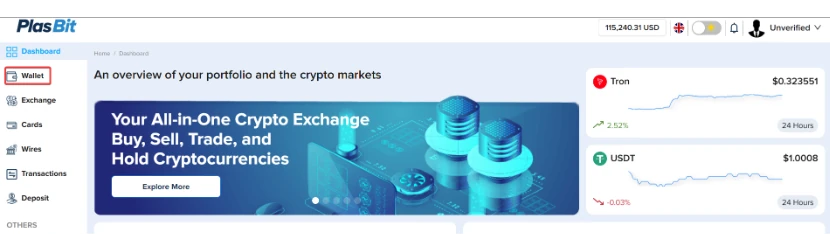
Step 1: Log in to your PlasBit Dashboard and go to the Wallet section.
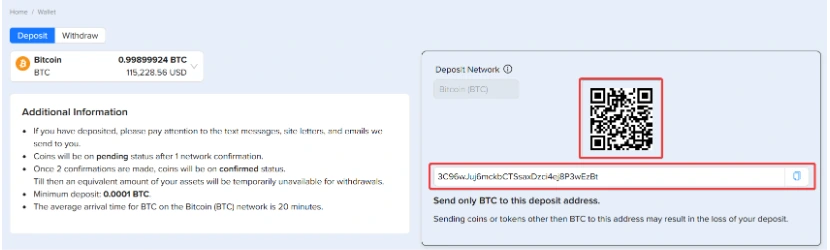
Step 2: Deposit the cryptocurrency you’d like to pay with.
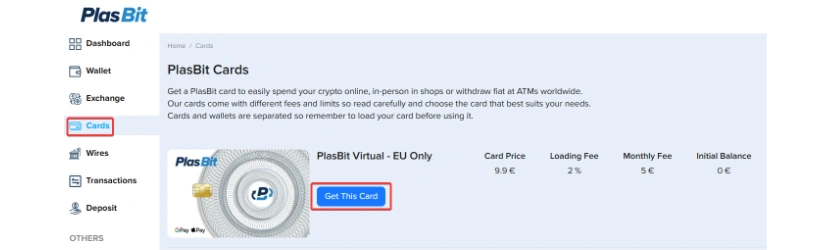
Step 3: Navigate to the Cards section, select the Crypto Card you want to buy, and click Get This Card.
Step 4: Choose the Payment Wallet that you want to use to issue the card.
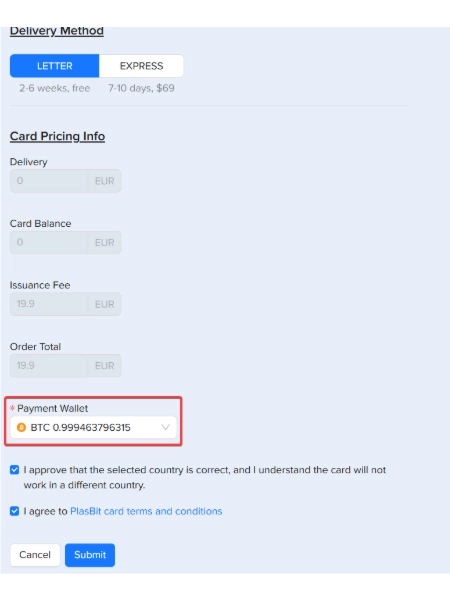
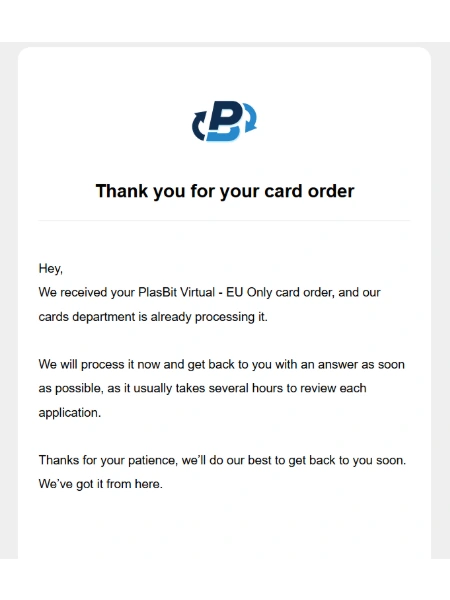
Step 5: Now, sit back and relax while you wait for the card confirmation. We’ll get back to you very soon. Once your crypto card has been successfully issued, you will receive a notification and the verification code via email.
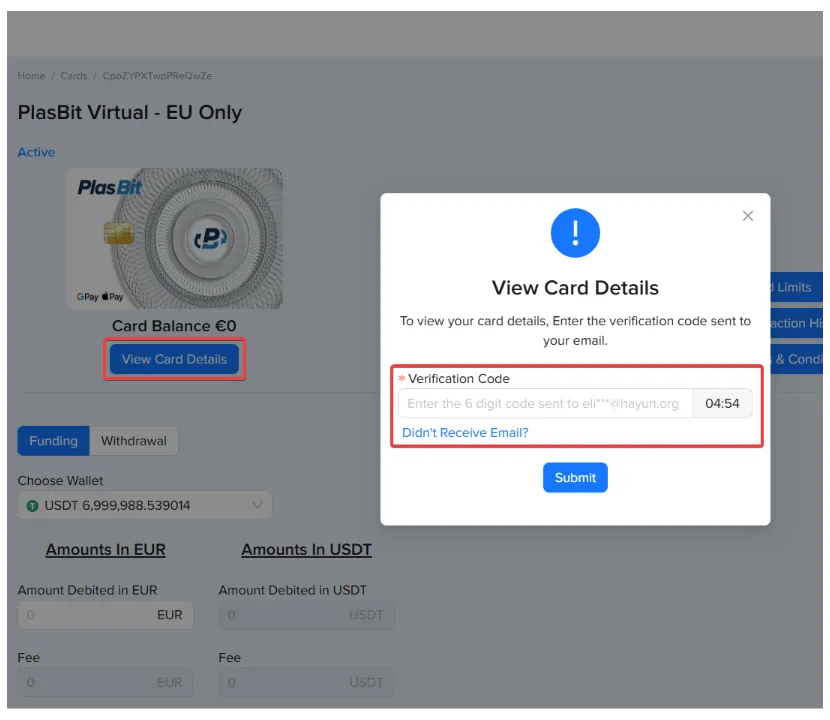
Step 6: Now, go back to the Cards section, click Open Details on your PlasBit crypto card, then click View Card Details, and enter the verification code you received via email.
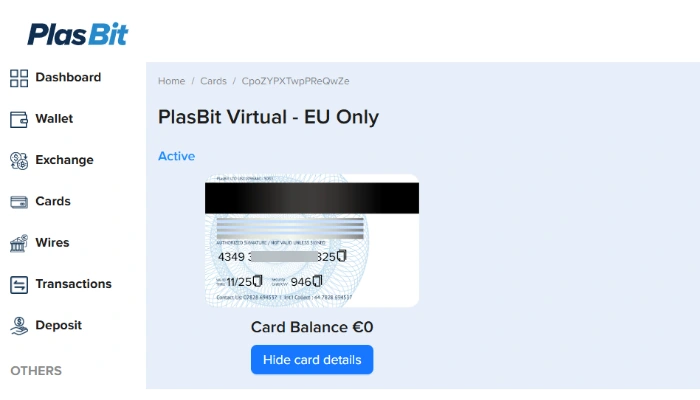
Step 7: After entering the verification code from email, you will be able to see your card number, expiry date, and CVV. Congrats! You now have your card.
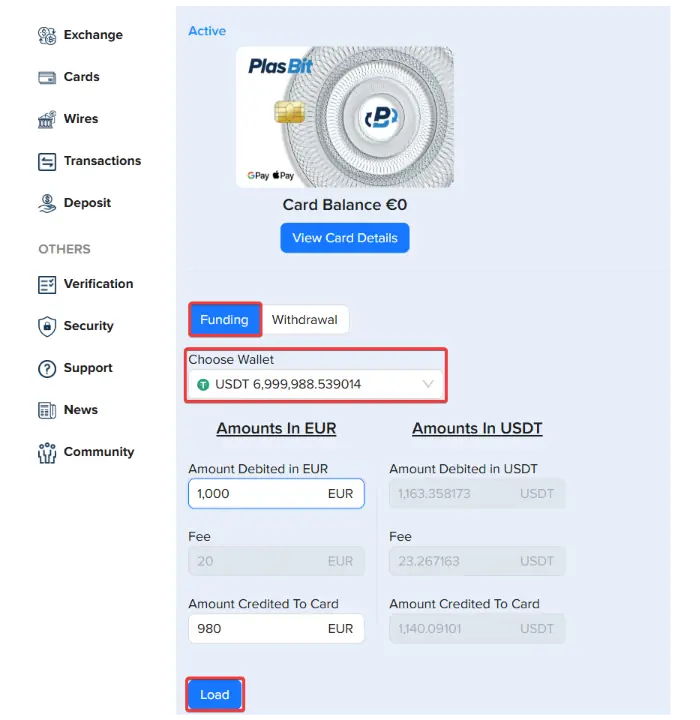
Step 8: Now, to use your new card, you’ll need to load balance onto it. Go to the Funding tab and choose the wallet you wish to charge (in our case, USDT). Next, enter the amount you want to put onto your card and click Load.
Connecting the card with Google Pay
Step 1: Make sure that your smartphone supports NFC contactless payment. Install the Google Wallet application and open it.
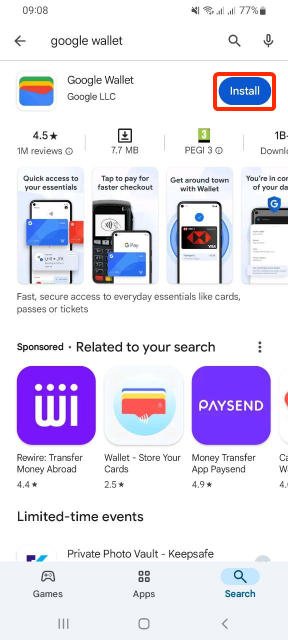
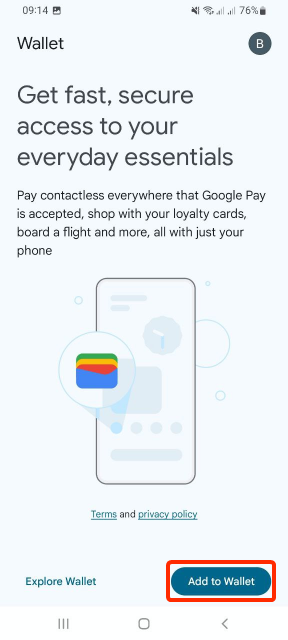
Step 2: In the app, click on the Add to Wallet button.
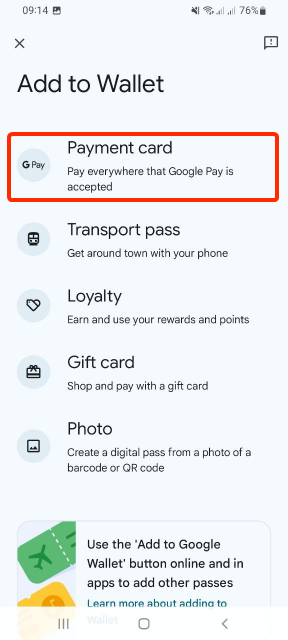
Step 3: Next, click to add a Payment card.
Step 4: Choose the New credit or debit card option.
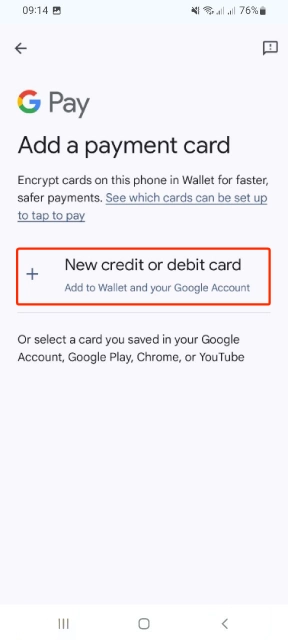
Step 5: Now, fill in the card details manually, or simply scan the card with your smartphone camera, whichever option you prefer.
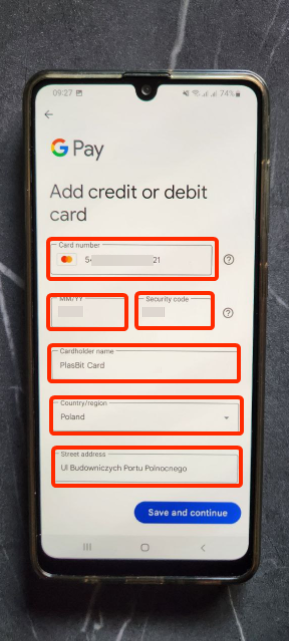
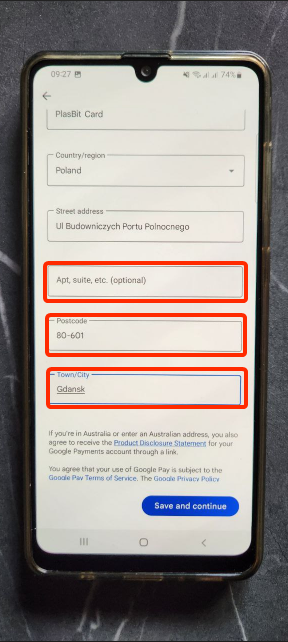
Step 6: Add your address information, including your country, city, postcode, and street.
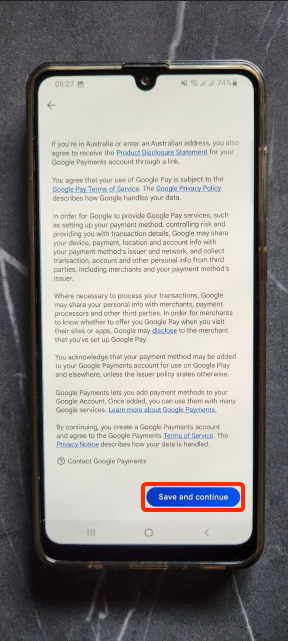
Step 7: Read and review the terms and conditions, then click Save and continue to agree and proceed with adding the card.
Step 8: Read and review the Issuer Terms, then click Accept if you agree.
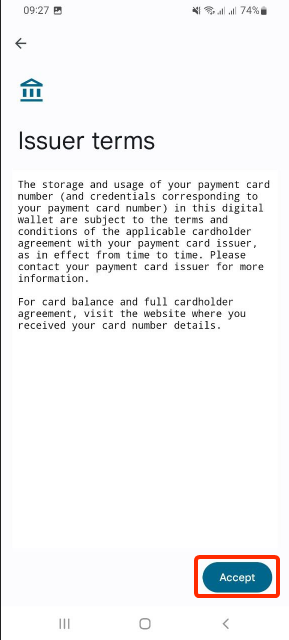
Step 9: The card will now be processed, and you will be redirected to a confirmation page. Once there, click OK to finish the process.
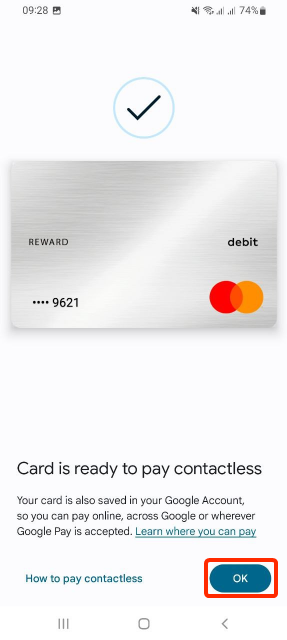
Step 10: Your PlaBbit card has been successfully added to your Google Pay account and is now ready for use!
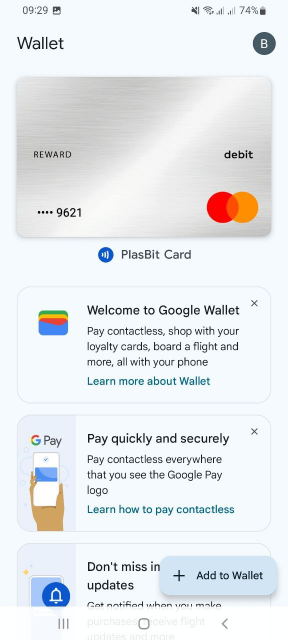
That's it, your card is all set.
See For Yourself How Simple Paying With Crypto Cards Really Is
Check out this video and see for yourself how short and easy this process is. A woman uses a PlasBit card, which is already connected to her Google Pay, to buy clothes with crypto. Note that the seller clearly states that the shop doesn’t accept Bitcoin, and yet with just a single tap of her phone to the card machine, she pays for her item in mere seconds, without any problems.

She’s not doing anything special, there are no additional “crypto stuff” she needs to do and no extra steps she needs to take. For the user and the merchant, everything is absolutely the same as using any other bank card. Had she not mentioned BTC, the seller wouldn’t have even known crypto was involved, because to the shop, it’s a payment like any other. She pays with her Google Pay by tapping on the POS terminal, and he receives money in his local currency.
It’s behind the scenes where the tech magic happens. Your crypto will actually go through a centralized exchange of your choice. As soon as you load your card, the crypto is converted into the local currency, and this is what the seller receives as soon as you pay. It’s fast, cheap, and transparent, and best of all, neither you nor the merchant has to think about it. Your crypto card will only get charged up to the amount you loaded, so the payment itself has no contact with your crypto wallet or your traditional bank account.
Can I Use Crypto On Google Pay?
Google Pay is a very convenient and fast way to end a shopping trip. It saves us the trouble of going through our physical wallets, looking for bills, coins, and debit cards. But what if we want to use our digital coins instead? To answer your question, can I use crypto on Google Pay? Yes, you can order a PlasBit card, load it with crypto, and add it to your Google Pay account as a payment method. Once added, you can use it like a regular bank card and pay for your everyday expenses with your crypto card via Google Pay. As of now, Google Pay does not support direct crypto payments.
Another super useful thing about these cards is that the entire family can use them. For example, the adults can pay bills, buy food, purchase new clothes, perhaps a new appliance, or pay for a vacation. Parents can get a separate card for their kid and load it up with the allowance. Once the cards are connected to Google Pay and then to each other, parents can simply send a fixed amount of money to the child’s card. It allows parents to easily control their children’s spending by setting a clear budget. At the same time, this is giving some independence to minors who can’t have a bank account yet, teaching them financial responsibility before they gain full control over their own money.
You can do something similar if you’re helping out another family member or a friend, such as an elderly or sick person in need of assistance, if they use Google Pay. You can get them their own card, connect it to Google Pay, and then send them money as needed. You always remain in control of your funds, and people you connect cards with can’t access the balance on your card. You’re in full command of how much and how often you load others’ cards.
Does Google Pay Accept Crypto?
Google itself doesn’t accept crypto for its many services (at least not yet), and traditional banks can’t handle it directly either. But ‘directly’ is the key word here, because there are indirect ways to combine Google and cryptocurrency. What does that mean then? Does Google Pay accept crypto? Yes, if you use a PlasBit card, load it with crypto, and add it as a payment method to your Google Pay account. Currently, Google Pay does not accept crypto directly.
Does Google Pay Work with Bitcoin as a Payment Method?
Bitcoin is the world’s first and strongest crypto out there. As of early 2026, some half a billion people hold BTC in their digital wallets, but their options to spend it directly are quite limited. Still, there are other ways to use it now. Does Google Pay work with Bitcoin as a payment method? Yes, but not directly. To pay with your Bitcoin via Google Pay, order a PlasBit card, load it with Bitcoin, and add the card to your Google Pay as a payment method.
Google Helps Protect Your Privacy And Card Details
Now that we’ve answered can you add crypto card to Google Pay, let’s look into some of the many benefits that we get with this option. Paying with a crypto card via Google Pay comes with a great advantage, because it hides your card details. Once you add your actual card to Google Pay, it will create another version of that card, with a randomly generated number, which will act like a “stand-in.” This is a security process that makes sure your sensitive card details aren’t shared with merchants in any way. This number doesn’t change for that specific device, but it’s accompanied by a dynamic security code that does change every time you pay.
Therefore, when you go to a store and tap the card terminal, it will not be able to see your real card details. Instead, it will see the “stand-in” number and will get a one-time code for each transaction, so even if somebody were to see or intercept this information, they wouldn’t be able to use it for any future purchases. Also, the receipt will show only the last 4 digits of the “stand-in” that Google Pay generated as the number for your card, and not the digits of your actual PlasBit (or any other) card.
Additionally, to strengthen security, Google Pay will never ask for additional personal information, for example via email, so report and block such emails right away.
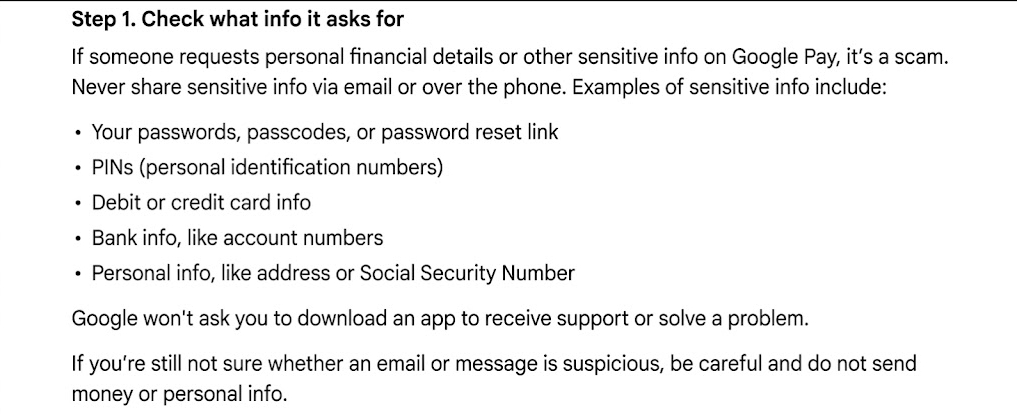
“How to tell if an email is suspicious.” Source: Google Pay Help
Great Way to Pay For Subscriptions With Crypto
Certain platforms don’t currently accept debit cards as a payment method for a monthly subscription, which makes regular payments very inconvenient, or in some cases, makes the subscription itself impossible. But we’ve got a solution for this too, because you can make use of Bitcoin and Google Pay for this as well. Connect your crypto card with Google Pay, load it with BTC or other crypto, and you’ll be able to bypass the restriction and subscribe to your chosen platform. This way, you can set up recurring and automatic monthly payments for services that support this option, such as YouTube Premium or Netflix.
However, you don’t need to limit your Google Pay virtual card to these restrictive platforms. It’s an excellent way to protect your real information when subscribing to any service. Let’s take Spotify, one of the biggest platforms in the world, as an example. If you connect your crypto card to your Google Pay and then choose Google Pay as the payment method on Spotify, the platform will only receive the randomly generated card number, not your actual data. These are all quite useful and convenient tools, and you can do it all with crypto via the “PlasBit card & Google Pay” combo.
Is Bitcoin Coming to Google?
Currently, there are no indications that Google will add Bitcoin as a direct payment method, at least not this year. But that’s not to say that it’s completely opposing the crypto sector. Instead, it’s been getting increasingly involved with it over the past few years. In early 2025, reports claimed that this company with four billion users had been working for a year to integrate BTC functionality into its services, in order for Bitcoin wallets to match the Web2 user experiences. This would also enable easier transactions via Google accounts and make crypto payments as intuitive as anything else we do on Google. In late 2025, Google added an extension for crypto payments to a payments protocol.
Besides this, Google Cloud is developing its own layer-1 blockchain, has previously integrated with various blockchains (including Bitcoin), and has partnered with Coinbase to allow selected customers to pay for services using BTC. Google also holds significant equity stakes in firms like Bitcoin mining company TeraWulf, providing a whopping $3.2 billion to support TeraWulf’s expansion. Overall, it’s safe to say that Google has already stepped into the crypto sphere and is likely to expand further. Soon, the question may not be can you add crypto card to Google Pay, but how can you use crypto on Google directly?
Conclusion
Using Google Pay in combination with your crypto card is a really handy way to pay for anything you are buying, be it in-store or online, just once or on a regular basis. Importantly, you will never feel any difference when paying with crypto, because you use your crypto card as you would any regular bank card anywhere you typically use it, be it a clothing store, a supermarket, an amusement park, a hotel, and so on. Just load your card with crypto and make sure it’s connected with Google Pay, then all you need to do going forward is tap the card terminal, and you’re done. You can also pay for online purchases and subscriptions, including streaming services. All in all, this is a cheap, transparent, and fast method of payment, which also protects your real card number from any thieves looking for an opportunity.